Blog
WhatsApp: Have the hackers taken over your account?
WhatsApp remains one of the UK’s most popular messaging apps, but its popularity has also made it a prime target for cybercriminals. A fast‑moving scam currently circulating can allow fraudsters to take over your account in seconds – and worryingly, it often appears to come from someone you trust.
The PIN code scam – How does it work?
The scam usually begins with a message that looks completely harmless. It arrives from a close friend, family member, or colleague – often someone you’ve messaged recently. That’s because their account has already been compromised.
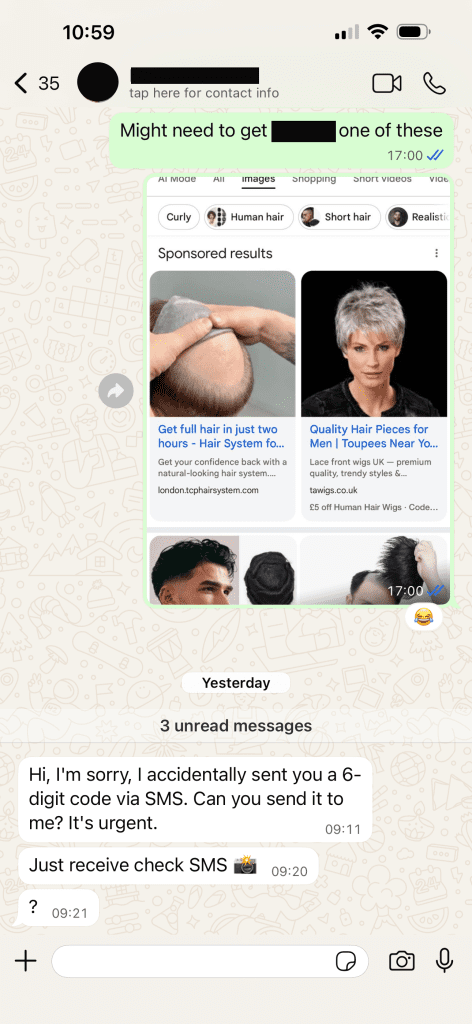
The message typically asks for help, claiming they’ve been locked out of their account, need to “verify” something urgently or they have “accidently” sent you a text (see the real example that a member of our team received, ignore the previous conversation 🤣). Shortly after, you receive a six‑digit code by SMS (not via WhatsApp). The scammer will then ask you to share that code with them.
This is the critical moment.
That six‑digit number is actually a WhatsApp login code. If you share it, you’re effectively handing over the keys to your account. Once entered, the attacker gains full access and can immediately start messaging your contacts, repeating the scam.
Cybercriminals rely heavily on urgency and panic, encouraging victims to act quickly without thinking. When pressure is involved, even tech‑savvy users can make mistakes.
What has WhatsApp (Meta) changed?
Meta has introduced new safety measures to make the scam easier to spot – although it hasn’t eliminated it entirely.
WhatsApp now displays clearer warnings when a login attempt comes from another location. If someone tries to access your account abroad, you’ll see a message explicitly stating where the device is attempting to connect from. This replaces a much smaller warning that was often missed in the past.
Meta is also testing additional alerts for suspicious messages and unusual contact behaviour across its messaging platforms.
These changes help, but they still rely on users staying alert.
What to do if your account is taken over?
If you realise your account has been hijacked, act fast:
- Try logging back into WhatsApp and choose call verification instead of SMS.
- This can bypass delays the scammer may have triggered to lock you out.
- After regaining access, immediately enable additional security features.
You should also message your contacts using another platform to warn them not to trust messages sent from your compromised account.
How to protect yourself going forward
The most effective defence is prevention. Follow these best practices to stay safe:
✅ Never share one‑time codes
WhatsApp will never ask you to share login codes with anyone – even friends.
✅ Enable two‑step verification
This adds a PIN code that attackers can’t bypass with just a text message.
Go to Settings → Account → Two‑step verification → Turn on.
✅ Add an email address
Linking an email makes it far easier to recover your account if something goes wrong.
✅ Slow down
If a message feels rushed, emotional, or unusual – pause. Scammers depend on speed.

Jig Mehta
Is a Digital Marketing Manager at Select Technology, he has been part of the team for over 6 years, and has a keen interest in technology, whether its technical specs, cybersecurity or AI!